
A digital business card has one job: help the right person reach you in one tap, and remember you later. What you put on it decides whether that happens. This guide covers what to put on a digital business card, what to leave out, and gives twelve examples by profession that you can copy and adapt.
The must-haves
Every card, whatever your work, needs these four things:
- Your name, as clients know you. If people know your business better than your name, add the business name too.
- A photo of you or your logo. A face builds trust faster than any sentence. Use a logo when people buy from a brand rather than from you.
- One line about what you do. More on this below.
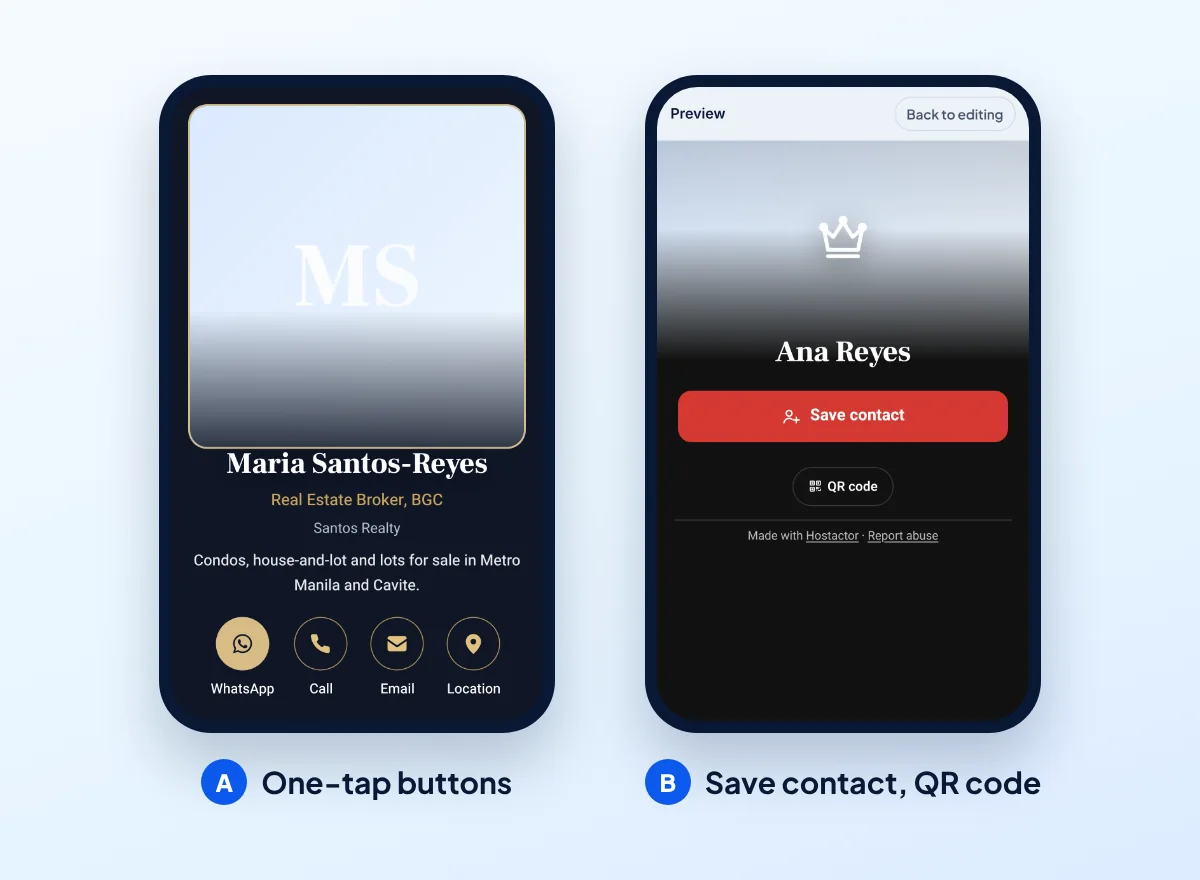
- One-tap ways to reach you. Pick the two or three you really answer: a call button, a WhatsApp chat, an email. Put first the one you reply to fastest.
A good card also has a Save contact button, so people can add you to their phone in one tap instead of typing your number. On a Hostactor digital business card it is added for you.
Your one-line title
Under your name, write what you do in the words a client would use. Not a job title from an org chart, but the answer to "what can you do for me?". Keep it under about 40 characters so it fits on one or two lines on a phone.
- Instead of "Creative Director", try "Logo and brand design for small businesses".
- Instead of "Owner", try "Home-cooked meals, catering for events".
- Instead of "Consultant", try "Bookkeeping for freelancers and shops".
Add your area if you work locally ("Plumber, north side of the city"). It tells people at a glance whether you can help them.
Nice to have
Add these when they help a client decide to contact you:
- Address or map, if clients come to you: a shop, a clinic, a studio. A map link lets them get directions in one tap.
- Opening hours, if people visit or call at set times.
- A short description of one or two sentences: what you are known for, who you work with.
- Your website or online store, if you have one.
- Social profiles that show your work, such as an Instagram full of your photos or a Facebook page with reviews.
- A small gallery of your work, if your work is visual: food, haircuts, interiors, events.
What to leave out
Every extra button makes the important ones harder to find. Leave out:
- Numbers you do not answer, such as an old landline or a shared office number.
- Every social network you ever joined. A profile with no posts since last year does more harm than good.
- Your home address, if you work from home. Give a service area instead.
- Long biographies. The card gets people to contact you; your website can tell the full story.
- Claims you cannot back up, such as "number one in the city" or awards you did not win.
12 examples by profession
Use these as a starting point. The buttons are listed in the order most clients in that kind of work tend to use them; change the order to match how you work.
| Profession | Title line | Buttons first | Also add |
|---|---|---|---|
| Freelance designer | Logo and brand design for small businesses | WhatsApp, email | Portfolio link, Instagram, gallery |
| Photographer | Wedding and event photographer | WhatsApp, email | Gallery, Instagram, area you cover |
| Real estate agent | Homes and condos for sale and rent | Call, WhatsApp | Licence details as your rules require, listings page |
| Home cook or caterer | Home-cooked meals, catering for events | WhatsApp, call | Menu link, pickup area, gallery of dishes |
| Makeup artist | Bridal and event makeup | WhatsApp, Instagram | Gallery, area you travel to |
| Dentist or clinic | Family dentistry, cleaning and fillings | Call, WhatsApp | Address with map, opening hours |
| Lawyer | Business and contract law | Call, email | Office address, opening hours |
| Personal trainer | Personal training, in person and online | WhatsApp, Instagram | Where you train, short description |
| Plumber or electrician | Repairs and installations, same-week visits | Call, WhatsApp | Service area, opening hours |
| Online seller | Handmade jewelry, shipped nationwide | WhatsApp, Instagram | Link to your online store, gallery |
| Tutor | Math and science tutoring, grades 7 to 12 | WhatsApp, email | Online or in person, available hours |
| Consultant or coach | Bookkeeping for freelancers and shops | Email, call | Website, LinkedIn, short description |
Your photo
The photo is the first thing people see, and it is how they recognize you when you meet. A good one does not need a studio:
- Face the light. Stand facing a window during the day.
- Show your face clearly, from the shoulders up, looking at the camera.
- Keep the background plain, or show your workplace if it says something about your work.
- Use a recent photo. People should recognize you from it.
If you sell under a brand, use your logo instead, and put a photo of your work in the gallery.
Frequently asked questions
How much should I put on a digital business card?
Less than you think: your name, a photo, one line about what you do and two or three ways to reach you. Add more only when it helps a client decide to contact you.
Should I put my home address on my card?
Only if clients visit you there. Your card is public once published, so if you work from home, give a service area instead.
Can I have both a call button and a WhatsApp button?
Yes. Many people prefer one or the other, so offering both is fine. Put first the one you answer fastest.
Can I change my card later?
Yes. Edit it and publish again. The link and QR code stay the same, so everything you already shared shows the new version.
Put it on a card
Make a free digital business card with your details, in a few minutes, from your phone.